









|
 |
|
|
 Print
|  |
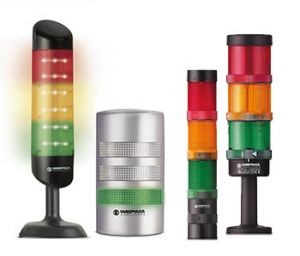
 Picture can differ from product | GSM Element 900/1800MHz | | Order number: | 646.700.55 |  | | Interface: | antenna connection: FME plug-in connection | | Starting current: | 450mA | | Dimension in mm: | ø 70 x 65 | | Protection rating: | IP65 | | Voltage: | 24V | | Voltage type: | DC | | Current consumption: | 50 mA | | Temperature range: | -20°C...+50°C | Frequently asked questions on this product
1. Can I use a Pre-Paid SIM-Card?
 Yes, but once the validity has expired or the credit has been used, the function of the GSM transmitter is no longer facilitated.
2. Is it possible to send control commands to my application/maschine using the GSM-Element?
 No, the GSM element is designed for monitoring maschine conditions.
3. What happens if the configuration parameter C10 contains 2x "e;1"e;, e.g. '0110' ?
 In this case a logical OR-ing of the multiple '1' takes place. Both externals inputs must be idle to activate the GSM element.
4. What happens if C9 is set to '1' but C10 is still set to '0000'?
 In this case the 'External control mode' is still deactivated.
5. What is meant by 'External control mode' (configuration parameters C9 and C10)?
 "In 'External control mode' the element can be activated or deactivated using e.g. an external switch.
Example: Deactivated during dayshift, activated during nightshift."
6. What is meant by 'System run time'?
 The 'System run time' informs the operator about how long the GSM element has been activated/energized.
7. What happens if the SMS is longer than 160 characters?
 The GSM element won't accept the SMS.
8. Is it possible to conduct an SMS and a voice call simultaneously?
 Yes, dual alarm can be selected.
9. What happens if the telephone line is busy while the GSM element tries to conduct a voice call?
 The duration of the voice call is user defined. After this time period the call is aborted and will not be repeated.
10. Is there a DECT-version of the element for integration in a local telephone system?
 No, not at the moment.
11. What happens to the alarm messages if the GSM element is temporarily disconnected from the mobile phone network?
 After getting connection to the mobile network the element delivers the accumulated alarm messages in the order of occurance.
12. Can I configure the GSM element by using a PC?
 No, the GSM element can only be configured via SMS from the master mobile phone.
13. Where does the GSM element store its data?
 All data is stored on the internal memory of the element. The SIM-card is not used for data storage.
14. Is it possible to perform the "easy" configuration by calling the element while using M2M-SIM-Cards?
 "No. M2M-SIM-Cards normally don't accept or conduct voice calls. Therefore the element has to be configurated via SMS. Please contact your provider to learn more about the limited functionality of M2M-SIM-Cards.
The use of these SIM-cards is not recommended."
15. Is it possible to use blanks as part of the Device ID (Name)?
 No, if doing so the characters behind the blank will be ignored.
16. Can I use any mobile phone to reset the element to default settings ?
 yes
17. Can the signal be transmitted to more than one mobile phone?
 Yes, it can be transmittet to up to three phones (one master and two additional operators).
18. Is it possible to set off a call or message to the conventional telephone network ?
 Yes, depending on the functionality of the telephone system.
19. Is it possible to operate the element with positive and negative logic?
 No, only with positive logic (common GND).
20. Is it possible to query the status at any time?
 At leased one of the individual elements of the signal tower must be energized. The use of an operating lamp is recommended.
21. Is every defined operator authorised to query the status of the transmitter element?
 No, only the master telephone.
22. What can happen if the PIN of my SIM card is not set to 0000 ?
 Everytime the GSM-Transmitter is energized the SIM card asks for the correct PIN. The GSM Transmitter Element atomatically answers with 0000. If this is not the correct PIN the SIM card may be blocked after three attempts. After that the SIM card has to be unblocked using a mobile phone and the PUK (Personal Unblocking Key). |
|
| |
|
|  |  | | « Back to overview |
|
|